Creating groups allows you to group certain work shifts under the same entity, which facilitates management and organization, especially if your organization includes several groups within your clientele. This step is essential before creating work shifts, as the Group field is mandatory.

Here are the steps to follow to create a group:

From the Administration menu, go to the Work Shifts module, then click on the Groups tab and then on the Add button to create a new group;
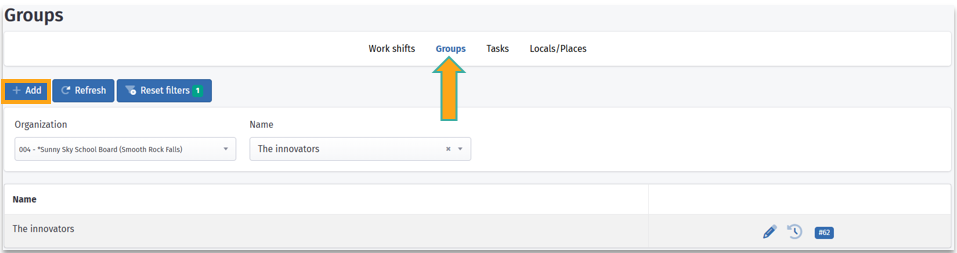

Fill in the group information:
The Organization field is filled in automatically. If you are linked to multiple organizations, you can select the desired one using the dropdown menu
- Then enter the name of the group in the designated field ;
- Click on Save to finalize the creation.


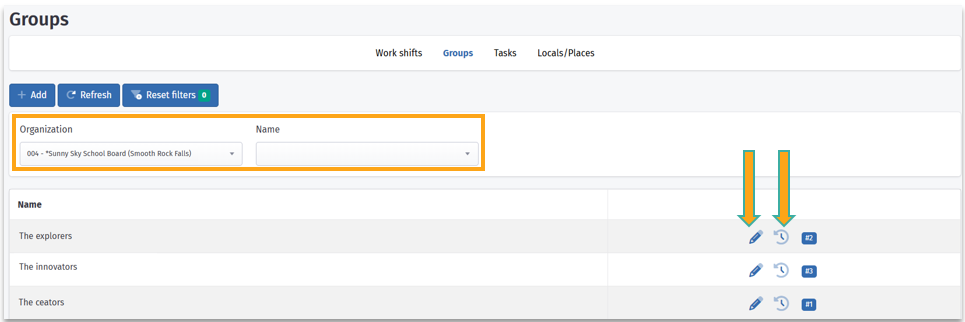
Once saved, the group appears in the list.
You can :
- Use the organization or name filters to quickly find a group ;
- Edit a group by clicking on the pencil icon
 ;
; - View the modification history of the group using the clock icon
 .
.
Was this article helpful?
That’s Great!
Thank you for your feedback
Sorry! We couldn't be helpful
Thank you for your feedback
Feedback sent
We appreciate your effort and will try to fix the article