To save time when planning, it is possible to quickly duplicate a single day or an entire week of work shifts. This feature allows you to easily reproduce recurring schedules, with or without overwriting existing data.
Go to the Work shifts module under the Administration menu. When creating a work shift using the Add button, you have the option to duplicate a day by clicking the Duplicate a day button, or duplicate a week by clicking the Duplicate a week button.

Caution, some periods may be duplicated at the same time as already existing time slots. Please check your dates and verify that this aligns with your intention.
 How to duplicate a day? How to duplicate a day? |
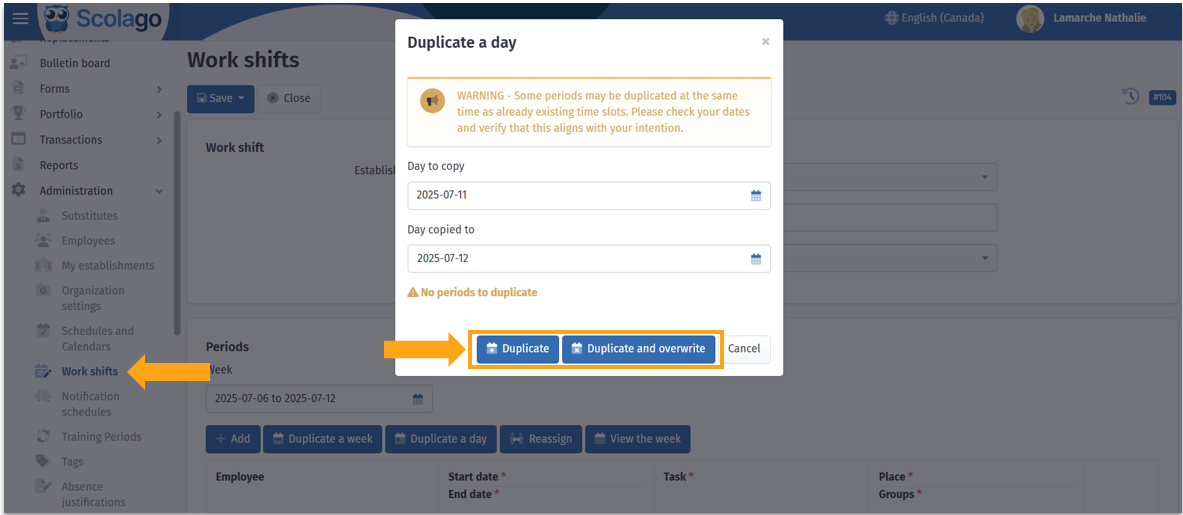
 In the page that opens, indicate in the first field the day to copy, and in the second field, day copied to, the day on which to apply the copy.
You then have two options:
- Duplicate : adds the content of the copied day to the selected date, without deleting what might already be there;
- Duplicate and overwrite: completely replaces the content of the day copied to, if there was already data.
 How to duplicate a week? How to duplicate a week? |

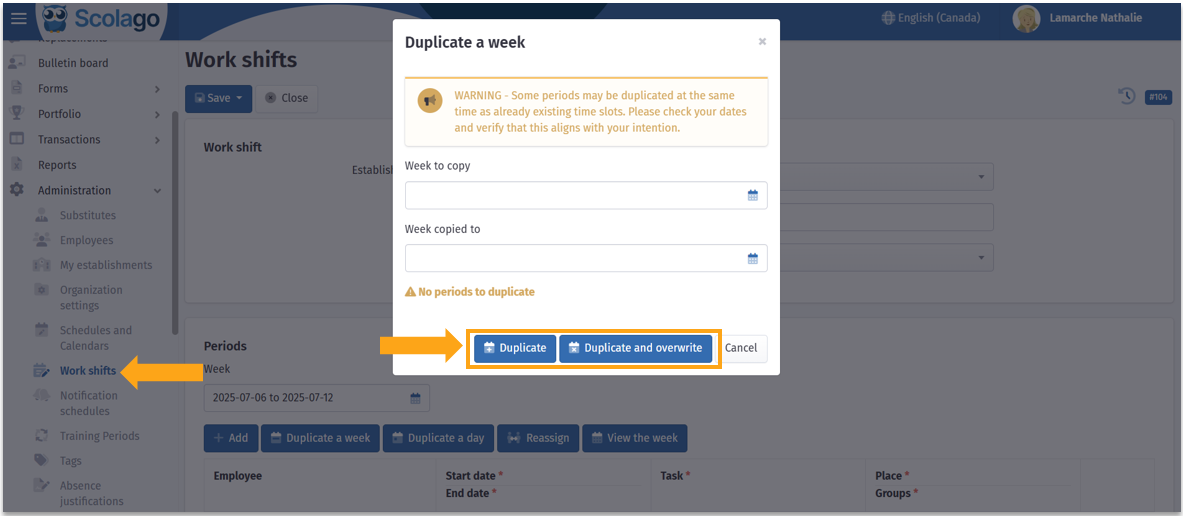
You can also duplicate an entire week by clicking the Week to copy button: select the week to copy, then the week on which to apply the copy in the Week copied to field.
Then, two choices are available:
- Duplicate: adds the shifts to the targeted week without deleting existing shifts in the selected week;
- Duplicate and overwrite : replaces the existing shifts in the week copied to.
 How to duplicate a complete work shift? How to duplicate a complete work shift? |
In the general view of the Work shifts module, it is possible to duplicate an already existing shift to save time when creating identical shifts. To do this:
- Locate the work shift you want to duplicate;
- Click the duplication icon
 ;
; - An exact copy of the shift will automatically be created, except for the employee's name, which will be removed from the periods;
- It is possible to rename the new work shift in order to better distinguish the original from the duplicate.


To review all the options explained above, watch this video: Video: How to duplicate a day, a week, or a work shift?.
Was this article helpful?
That’s Great!
Thank you for your feedback
Sorry! We couldn't be helpful
Thank you for your feedback
Feedback sent
We appreciate your effort and will try to fix the article