This module allows you to manage professional evaluations between employees and their managers by measuring the performance of various behaviours and skills required for the employee’s role.
Fully configurable by the organization, each evaluation is personalized and viewable in real time. Reminders to prevent delays and multiple options ensure a simple and streamlined process.
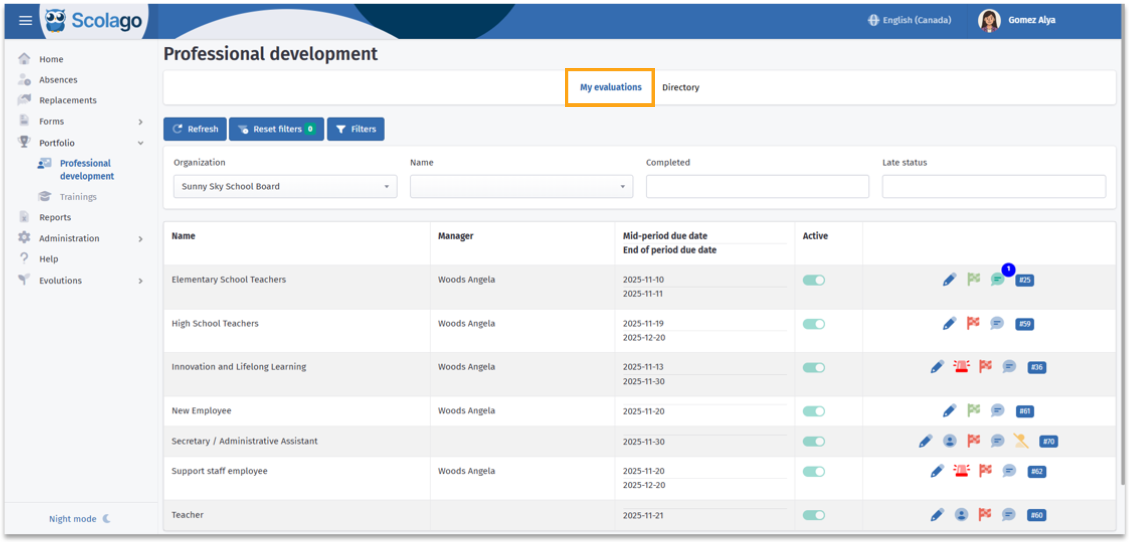
To access it, click on Portfolio in the left-hand menu, then select Professional development. The module is divided into two tabs: My evaluations and Directory.

To learn how the module works for an employee's evaluation, click on this link: Video: Employee - Understanding the professional evaluation process
 My evaluations Tab My evaluations Tab |
Here, a summary table provides information on the evaluations linked to your profile.
At the top of the page, three buttons are available:
 | : Refreshes the page to view any updates. |
 | : Removes applied filters and restores default settings. |
 | : Access an extra filter, Show disabled. |
The following filters help you locate the desired evaluation more quickly:
- Organization
- Name
- Completed
- Late status
The table also displays the evaluation name, the manager responsible, the due dates, and whether the evaluation is active or interrupted.
In the last column of the table, several icons may appear:
 | : Allows you to access the evaluation and make changes if needed. |
 | : Appears in the right-hand column when the mid-term or end-of-term due date has passed. |
 | : Indicates an evaluation you added yourself from the Directory without assigning a manager. |
 | : Shows that the evaluation is not completed, regardless of current progress. |
 | : When the flag turns green, it indicates that the evaluation has been completed by both you and the manager. Hovering over the icon shows the completion dates for both parties. |
 | : Allows you to add comments for communication between you and managers. |
 | : For personal evaluations, allows you to remove it from your evaluations. |
 | : A unique identification number for the evaluation. |

For more details on how the evaluation process works, see this article: How to fill out my professional evaluation?
 Directory Tab Directory Tab |
In this tab, you will find evaluations that you can add yourself to.
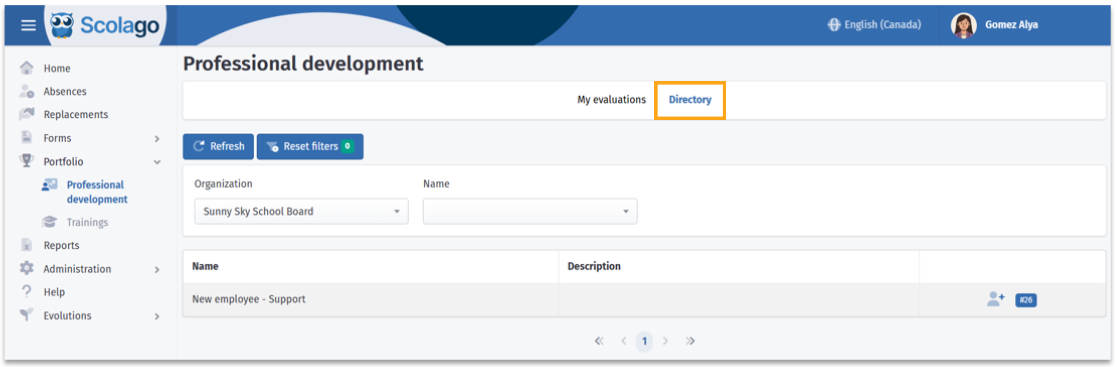
To help with your search, the Organization and Name filters are available.

For more information on adding yourself to an evaluation, see this article: How do you add yourself to evaluations in the ''Directory''?
Was this article helpful?
That’s Great!
Thank you for your feedback
Sorry! We couldn't be helpful
Thank you for your feedback
Feedback sent
We appreciate your effort and will try to fix the article