The modification of your email address is done by yourself from the General tab of your profile.
Here's how:

First, you must access your profile by clicking on your name located in the top right corner of the page. Then, click on My profile.


In the General tab, click on the pencil icon next to the Email field.
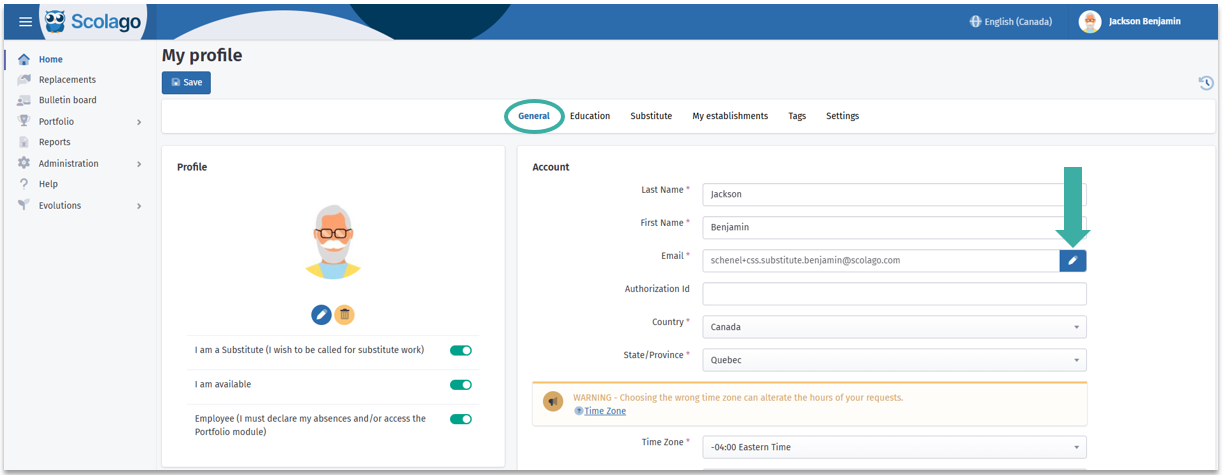
A window will open: enter your new address. Make sure there are no errors, then click Update.


A validation email will be sent to you. Don't forget to click on the link in the email to activate your new email address.
If you believe you have not received the email, we invite you to check your junk mail. If this is the case, the link may not work. First, you need to move the email to your inbox. To do this, click with the right mouse button on the email and choose "never block the sender". Then, with a second right click on the email, select "move to inbox". The link will then be functional.

Was this article helpful?
That’s Great!
Thank you for your feedback
Sorry! We couldn't be helpful
Thank you for your feedback
Feedback sent
We appreciate your effort and will try to fix the article